How autocorrect works: touch keyboards, typo models and the language model guessing what you meant
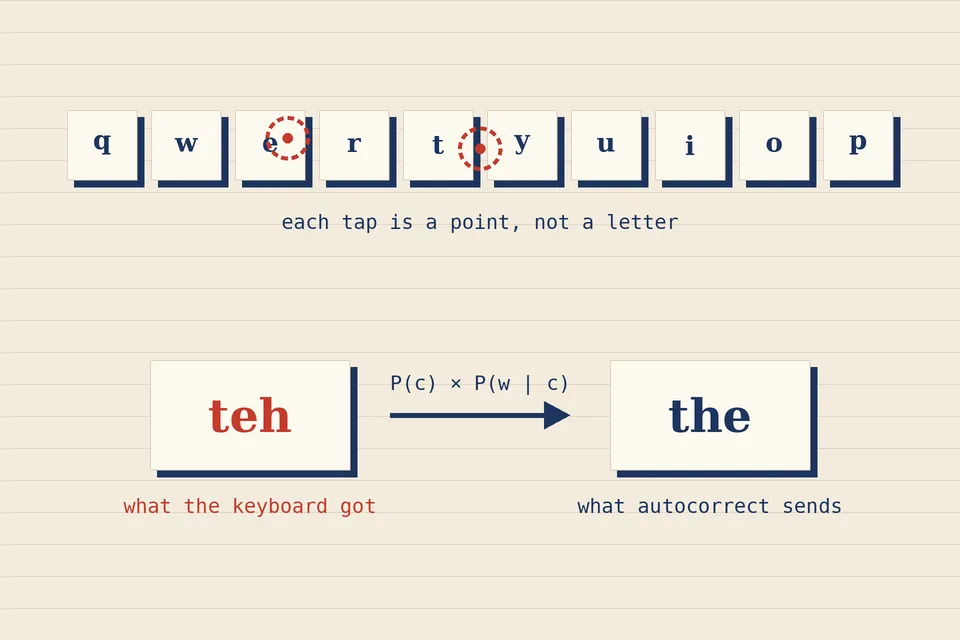
A spell checker underlines a word and waits for you. Autocorrect does not wait: it replaces the word as you hit the space bar, and it does so millions of times a day on phones that have no physical keys. That small difference in manners hides a very different piece of software. This note explains what autocorrect is computing, why it changes words you typed correctly, and what the recent complaints about phone keyboards were really about.
A spell checker with a deadline
A classic spell checker, as described in our note on how spell checkers work, does three things: it decides whether a word is in its dictionary, generates candidates that are a few edits away, and ranks them. Autocorrect runs the same pipeline, but under two extra constraints. It has to decide in a few milliseconds, between one keystroke and the next. And it has to decide alone: there is no list of suggestions for a human to pick from, only one word that silently takes the place of what you typed.
That second constraint changes the economics of error. A spell checker that offers a bad suggestion costs you a glance. An autocorrect that makes a bad replacement costs you a misread message, and often you do not notice until after you hit send.
The noisy channel: likelihood times typo
The standard way to frame the problem is the "noisy channel" model. You meant to type a word c; your thumbs and the glass screen add noise; the keyboard receives w. Autocorrect looks for the intended word that makes the observation most probable, which by Bayes' theorem means maximizing P(c) × P(w | c): how likely the word is in general, times how likely this particular typo is if that was the word you meant.
Peter Norvig's well-known essay How to Write a Spelling Corrector builds exactly this in about half a page of Python, with candidates up to two edits away and word frequencies counted from a corpus of about a million words. It is a good way to see both the power and the limits of the idea: his toy corrector got 68% of a 400-word test set right, and the essay concludes, "I met my goals for brevity, development time, and runtime speed, but not for accuracy." The edit operations it relies on are the ones explained in our Levenshtein and Damerau distance walkthrough.
What a touch keyboard adds: geometry
On a phone, the error model P(w | c) is not just about spelling. It is about where your thumb landed. A tap is a point on the screen, and the keyboard knows that a point between o and p is ambiguous. Instead of committing to one letter per tap, a modern keyboard keeps several hypotheses alive and scores whole words by how well their letters line up with the sequence of touch points. Swiping, where you draw a path across the letters, is the same idea taken to its limit: there are no individual keystrokes at all, only a curve to match against the shapes of known words.
Geometry explains one family of odd corrections. Words whose letters sit close together on the QWERTY layout are cheap to confuse, so a sloppy if can plausibly become of, and a slightly misplaced thumb turns one valid word into a different valid word. Because both are in the dictionary, nothing looks wrong to the software. This is the touch-screen cousin of the real-word errors described in our article on homophones spell checkers miss.
The dictionary problem, from Cupertino to "ducking"
The other half of the formula, P(c), is where many famous failures come from. If a word is missing from the list, or listed with a tiny frequency, autocorrect will push you away from it. The oldest documented case gave the phenomenon its name: Wikipedia's article on the Cupertino effect explains that early spell checkers knew only the hyphenated co-operation and so suggested Cupertino for cooperation, a substitution that then turned up in official documents.
The phone era's best-known example was deliberate. For years, iPhone keyboards turned a common expletive into ducking, because the word was effectively kept out of the vocabulary. When Apple announced iOS 17 in June 2023, it presented the fix as a learning feature. As NPR reported, software chief Craig Federighi told the WWDC audience: "In those moments where you just want to type a ducking word, well, the keyboard will learn it, too."
From word lists to language models
The bigger change in that announcement was the machinery behind it. Apple's iOS 17 press release said autocorrect "receives a comprehensive update with a transformer language model", described as an on-device model for word prediction. In practice this replaces a flat frequency per word with a probability that depends on context: their and there are no longer competing on general popularity alone, but on how well each fits the words you have already typed.
Google had moved in a similar direction years earlier with a privacy twist. In an April 2017 post on federated learning, Google researchers described testing it in Gboard, its Android keyboard: the phone improves a shared model locally and sends back only a small, encrypted update, so that "all the training data remains on your device." A 2018 paper by the Gboard team, Federated Learning for Mobile Keyboard Prediction, reported that a next-word model trained this way achieved better prediction recall than one trained on a server.
Language models fix many context errors, but they introduce a new kind of confidence. A model that has learned what people usually write will happily "correct" an unusual but deliberate phrase, a surname, or a word in another language into something more typical. Personal learning helps, which is why the keyboard eventually stops fighting the names you type often, but it needs examples first.
When the problem is the keyboard, not the corrector
Autocorrect can only be as good as the letters it receives. That distinction mattered in the most recent wave of complaints. After iOS 26 shipped in September 2025, many iPhone users said their typing had suddenly got worse; TechRadar summed up the mood in a headline: "You're not bad at typing – iOS 26's autocorrect is broken". When Apple's fix arrived, the release note for iOS 26.4 promised "improved keyboard accuracy when typing quickly", and MacRumors explained the underlying bug: characters that users had tapped were sometimes not registered, and autocorrect, handed words with missing letters, could not work out what was intended.
That is a useful lesson for anyone building text tools. The noisy channel assumes the noise is human. When the input layer itself drops letters, the corrector faces typos of a kind it was never trained on, and its most confident guesses become its worst ones.
Living with autocorrect
- Undo immediately. On most phone keyboards, deleting right after a replacement offers the original word back, and choosing it is a signal the keyboard can learn from.
- Teach it your words. Names, technical terms and words from other languages you type often are exactly what a general model gets wrong. Typing them a few times, or adding them as text shortcuts, helps.
- Check real words, not just red underlines. Autocorrect never produces a non-word; its mistakes are always valid words in the wrong place. Re-read for meaning before sending anything important.
- For long texts, separate writing from checking. Draft, then run the text through a checker that shows you what it would change, such as our spell checker, instead of trusting silent replacements.
A spell checker asks; autocorrect decides. Most autocorrect howlers are not spelling mistakes at all, but correct words chosen with too much confidence.
Sources
- Peter Norvig, How to Write a Spelling Corrector (probability model, candidate generation, accuracy figures).
- Apple Newsroom, iOS 17 makes iPhone more personal and intuitive, 5 June 2023; NPR, "What the duck" no more, 7 June 2023.
- Google Research, Federated Learning: Collaborative Machine Learning without Centralized Training Data, 6 April 2017; A. Hard et al., Federated Learning for Mobile Keyboard Prediction, arXiv:1811.03604.
- MacRumors, iOS 26.4 Fixes iPhone Keyboard Accuracy Bug, 18 March 2026; TechRadar, iOS 26 autocorrect coverage.
- Wikipedia, Cupertino effect. All links checked on 21 November 2026.
 Under the hood
How spell checkers work
Word lists, affix rules, edit distance and how suggestions get ranked.
 Under the hood
Levenshtein distance in JavaScript
Edit distance step by step, with the Damerau transposition variant.
 Spelling & writing
Homophones spell checkers miss
Their, there, they're: real-word errors no dictionary lookup can catch.