CSS hyphens: auto, soft hyphens and the lang attribute, explained
Browsers can hyphenate words at the end of a line, the way printed books do, and one CSS property switches it on. The most common complaint is that hyphens: auto "does nothing". The cause is almost always the same: the page never told the browser which language the text is in.
The short answer
<html lang="en">
...
p {
  hyphens: auto;
  -webkit-hyphens: auto; /* Safari before version 17 */
}
Declare the language on the root element, set hyphens: auto on the text you want hyphenated, and keep the prefixed line if you still support older Safari. The rest of this note explains why each piece is needed.
Three values: none, manual and auto
The hyphens property is defined in the W3C's CSS Text Module Level 3, a Candidate Recommendation Draft. It takes three keywords, is inherited, and its initial value is manual:
none: words are never hyphenated, even where the text contains explicit hints. Hyphens that are really typed in the text, as in well-known, still allow a line break after them;noneonly stops the browser from adding new ones.manual(the default): words break only where the text itself suggests it, with a soft hyphen.auto: the browser may also find break points on its own, using a hyphenation dictionary for the language of the text.
The specification is careful to call hyphenation a rendering effect only. The hyphen you see at the line end is not part of the content: it must not affect copying, selecting or searching the text. Search the page for concluding and you will find it, even if it is displayed as conclud- and ing on two lines.
Soft hyphens: suggesting a break by hand
The soft hyphen is Unicode character U+00AD, written ­ in HTML. It is invisible unless the line actually breaks there, in which case a hyphen appears:
<h2>Super­cali­fragilistic</h2>This works with the default manual value, so it needs no CSS at all. Soft hyphens are useful for long words in narrow places, such as headings on a phone screen, product names or table headers, and for languages the browser cannot hyphenate automatically. The specification adds one rule that is easy to miss: under hyphens: auto, if a word contains a soft hyphen, the browser should use your soft hyphens rather than its own break points, falling back to automatic ones only if the word still does not fit.
Two related tools do something different. <wbr> marks a place where a line may break without a hyphen, which suits URLs and file paths. The CSS property overflow-wrap: anywhere breaks an overlong string at any character to stop it overflowing its box; it is a last resort, not hyphenation.
Why hyphens: auto does nothing without lang
Automatic hyphenation needs rules for the language at hand: English, Dutch and Hungarian split words at different places, and some languages change the spelling of a word when it is hyphenated. The CSS specification therefore says that a browser must only hyphenate automatically when the content language is known and it has a suitable hyphenation resource for that language, and it asks authors to tag their content's language with the HTML lang attribute.
In practice, browsers do not hyphenate text whose language they do not know, so a page without lang usually gets no automatic hyphenation at all. The W3C Internationalization Activity's guide to declaring language in HTML gives the right pattern: put lang on the <html> element, and add it to any element that contains another language.
<html lang="en-GB">
...
<p>The quotation reads <span lang="de">Donaudampfschifffahrtsgesellschaft</span>.</p>
That German word will now be hyphenated with German rules. The same lang attribute also guides screen readers and, as explained in our note on the HTML spellcheck attribute, can influence which dictionary the browser's spell checker uses.
Other reasons it seems not to work
- The language has no dictionary in that browser. Coverage differs widely. According to MDN's browser compatibility data, consulted in November 2026, Chrome hyphenates English, French, Spanish and German but not Polish, Finnish or Catalan, while Firefox and Safari cover different lists.
- The text never wraps. Hyphenation only happens at a line break. A wide column,
white-space: nowrapor a short word gives the browser nothing to do. - The word is too short or looks like a name. Browsers may skip short words, and the specification allows heuristics such as leaving capitalised proper nouns alone.
- An older browser. Chrome on Windows and Linux has supported
autosince version 88; before that it worked only on macOS and Android. Safari supports the unprefixed property from version 17, hence the-webkit-hyphensline.
Where hyphenation helps
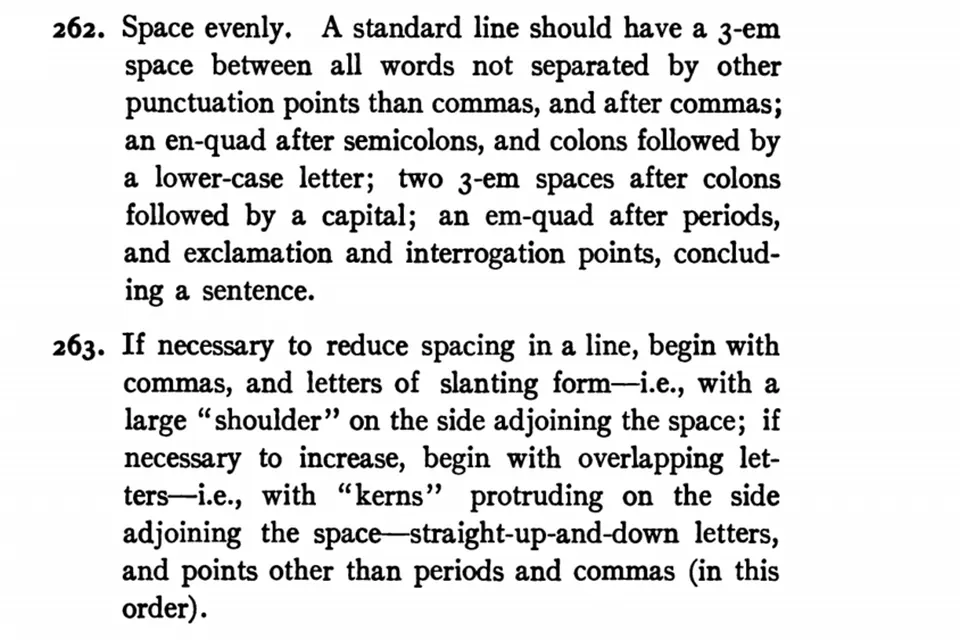
Hyphenation matters most when lines are short. In a narrow mobile column, a long word that cannot break leaves a gaping right edge or, worse, a word that overflows the screen. With text-align: justify, the effect is stronger: without hyphenation, the browser has to stretch the spaces between words to fill each line, which leaves the uneven gaps and "rivers" printers spent centuries avoiding. The 1911 Chicago style manual in the picture above devotes whole rules to word spacing for exactly this reason.
A reasonable default is to hyphenate body text on small screens and leave headings, navigation, buttons and code alone:
@media (max-width: 40em) {
  article p { hyphens: auto; -webkit-hyphens: auto; }
}
h1, h2, nav, button, code, pre { hyphens: manual; }
Never hyphenate code, email addresses or user names: a reader who copies them from a screenshot or reads them aloud will reproduce the hyphen.
Fine control: hyphenate-character and hyphenate-limit-chars
The CSS Text Module Level 4 working draft adds properties for typographers:
hyphenate-charactersets the string shown at the break, for examplehyphenate-character: "\2010";to display the Unicode hyphen U+2010 rather than the keyboard hyphen-minus. The default,auto, lets the browser pick the character the language normally uses. MDN lists support from Chrome 106, Firefox 98 and Safari 17.hyphenate-limit-charssets the minimum length of a hyphenated word and the minimum number of characters before and after the break.hyphenate-limit-chars: 6 3 2;means: only hyphenate words of at least six characters, keep at least three before the hyphen and two after. Support is newer and incomplete: MDN lists Chrome 109 and Firefox 137, with Safari only in its preview builds.
Both degrade gracefully: a browser that ignores them still hyphenates with its defaults.
Spelling and hyphenation share a dictionary problem
Hyphenation dictionaries face the same issue as spell checkers: they are tied to a language, sometimes to a regional variety. MDN notes that Safari uses different hyphenation dictionaries for en-GB and en-US, while Firefox uses an American dictionary for all English. Where a word may break can vary between varieties of a language, just as spelling does in colour and color. Declaring the variety you write in, lang="en-GB" or lang="en-US", costs nothing and gives each browser the best chance of getting both right.
 Under the hood
The HTML spellcheck attribute
How spellcheck and lang decide what the browser underlines in your forms.
 Under the hood
How spell checkers work
Word lists, affix rules, edit distance and how suggestions get ranked.
 Spelling & writing
American and British spelling
The handful of patterns behind color and colour, center and centre, -ize and -ise.